


Microsoft Copilot led to positive productivity shifts in 78% of companies, according to ElectroIQ. Users in these companies reported a 10-15% increase in productivity levels and a 19% decrease in burnout.
What’s more, Copilot is a tool that can help developers debug code, writers craft emails, and office workers complete many repetitive tasks.
If this sounds enticing to you, you may want to give Copilot a try.
Copilot is an emerging AI companion that hosts a range of services from generating content to planning itineraries.
At Psycray, we think this platform could be especially beneficial for our clients in the professional associations sector, who often have to juggle multiple tasks such as learning new terminology, event planning, and marketing, among other responsibilities. In fact, we’ve helped clients embrace Copilot by supporting them in using the tool for summarizing team threads, drafting Outlook responses, and utilizing quick Excel formulas.
In this blog post, we’ll cover the following:
- What is Copilot?
- Key Features.
- Common Uses.
- Practical Applications for Associations.
- Additional Benefits for Associations.
- Case Study of How We Helped Associations Using Technology.
- Concluding Thoughts.
What is Copilot?
Copilot is an AI-powered search and answer engine. It can easily answer questions, create images, produce a summary, introduce existing high-quality images, and more.
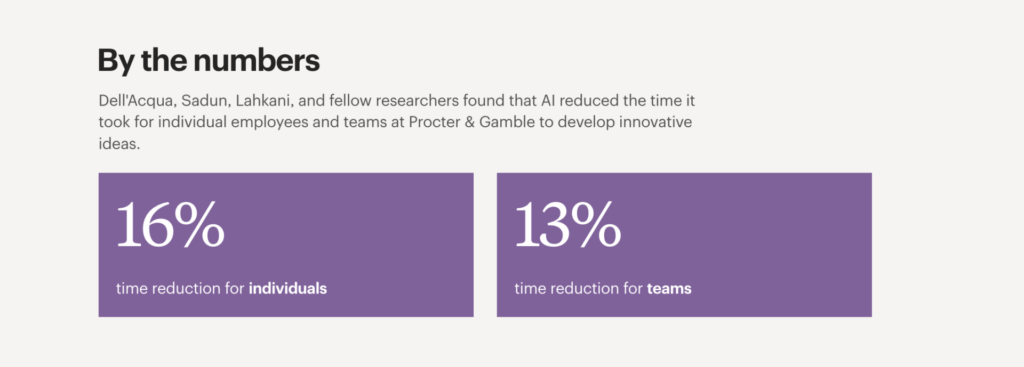
AI tools improve productivity and creativity dramatically. For instance, a study from Harvard Business School of Procter & Gamble found that those who used AI came up with more creative solutions and were less stressed than those who worked alone without AI. This suggests that all-in-one AI tools such as Copilot can improve efficiency, amplify creativity, and reduce stress.
Also, the researchers concluded that working in a human team with AI as a collaborative partner appeared to be the best option for success as opposed to working alone with or without AI. However, AI is effective in helping both individuals and teams.
Key Features of Copilot
- Copilot Video Creator: Copilot can easily generate 5-second videos using the words you give it.
- Copilot Image Creator: Copilot can convert your words into stunning visuals in a matter of seconds.
- Translator: Copilot can translate words to various languages in real-time.
- Web Search: Copilot’s search algorithms provide relevant results quickly, focusing on quality information over the quantity of sources.
Common Uses of Copilot
Copliot is commonly used as a research and writing assistant, according to Microsoft. It helps professionals draft emails, reports, and blog posts. It can also summarize documents, making it easier for professionals to interpret lengthy information.
Furthermore, it’s used for quick image and video generation, such as for business social media posts or marketing materials.
The tool’s versatility in everything from writing to content creation makes it a valuable all-in-one asset for any business.
Practical Applications for Professional Associations
Let’s pretend an employee is new to an investment recovery association and is overwhelmed by all of the new terminology she is seeing.
Any time she is stuck on a topic, she can use Copilot to help her find answers. That way, she can learn about her industry efficiently without having to spend lots of time researching on her own.
As another example, if another member is looking to get certified in their industry, they can consult Copilot to find out how and where to get certified.
In addition to benefiting from research assistance, members of professional associations can use Copilot’s generative AI features to take their associations to the next level. For example, they can use the tool to create informative thought leadership blog posts that attract potential members to their organization. They can also use the platform to generate compelling videos and images that will engage their members, such as videos promoting upcoming events. Lastly, they can use Copilot to aid with more tedious tasks like scheduling so that they can focus on higher-level strategies to improve their organization.
Copilot’s ability to deliver information and content efficiently makes it helpful for professional associations looking to grow and strengthen their membership base without hassle.
additional benefits for associations
According to Altai Systems, an association management software company, Copilot can be used for efficient audience segmentation with the Query Assistant feature. This not only saves marketers time in determining who to reach, but it also allows them to create tailored messages quickly.
With this feature, associations can use AI to make predictions about who their target audiences are, come up with messages that appeal to those audiences, and create strategies to retain those members.
What’s more, Copilot can gather data and use it to create actionable insights based on customer behavior, psychographics, and demographics. This allows associations to make more intelligent, tailored decisions based on the data AI helps them find.
Case Study Example of How We Helped Associations Using Technology
While we haven’t worked with Copilot in particular, we recognize the value associations can reap from technological solutions.
For instance, to help the Investment Recovery Association with their digital needs, we set up a membership community portal, an innovative asset 2.0 3D digital magazine, a white-labeled Content Management System (CMS) admin dashboard, and an on-site email campaign solution.
For the membership community portal, we facilitated communication between the IRA and its members and supported direct interactions between members. This enhanced member engagement and interaction.
As part of the 2.0 3D digital magazine solution, we included a dynamic 3D magazine to house the content, which created an immersive learning experience for viewers.
In the CMS solution, we created a custom admin dashboard for efficient content management. This streamlined admin operations and created a smoother content management experience.
Lastly, for the email campaign solution, we put an email marketing tool in the site’s backend and allowed IRA staff to create and send customized email campaigns. All of these technologies combined helped the IRA coordinate its digital marketing activities.
Concluding Thoughts
In conclusion, Copilot is a multi-skilled AI tool that can aid professional associations with everything from recruitment to event planning. By taking advantage of these tools, professional associations can free up time to focus on their offerings for professionals.
At Psycray, we help professional associations harness custom AI solutions to reach their potential. If this sounds like something your business could benefit from, feel free to contact us.